Verifying Your Sending-Email Domain

Table of Contents
Starting Summer 2026, Salesforce added additional requirements for verifying the domain of the email that you use to send emails from Salesforce. This article provides an overview of the requirements and how to verify your email address.
Domain Verification Overview
In this context, domain refers to the part of the email address that comes after @. So, for example, in the email address support@myhomekeeper.org, the domain that needs to be verified is myhomekeeper.org.
This security requirement ensures that any email addresses being used to send emails from HomeKeeper/Salesforce have been validated with a DKIM key. This proves that the email came from your domain and that the content wasn't altered in transit, which is a method used to send phishing emails.
How to Verify Your Domain
- Start by identifying which emails need to be verified. This Salesforce Help article provides a thorough overview of how to do so.
- Next, for any domains that have not been verified, you will need to create and activate a DKIM key. This Salesforce Help article provides an overview of setting up a DKIM key.
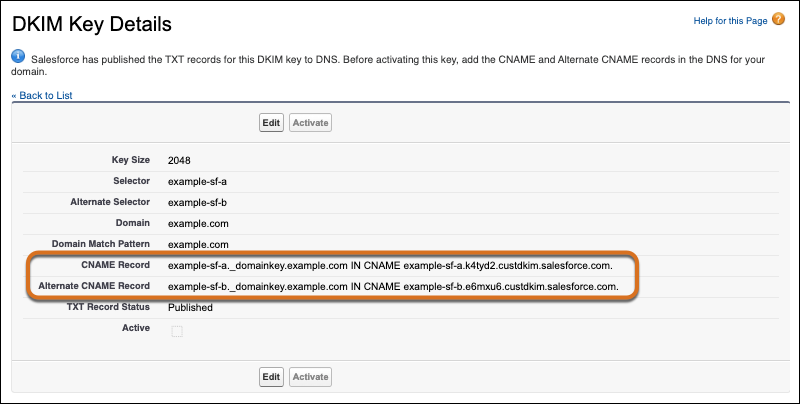
If you are not the website administrator for you domain, you will need to reach out to them for assistance. The CNAME records generated by your DKIM key will need to be added to your website's DNS record.
EXAMPLE: To request assistance with this, here is a sample email to send to your website administrator:
"Hello ____,
Salesforce is requiring us to set up a DKIM key to be able to send emails from Salesforce. Can you please add the following CNAME records to our website's DNS record.
- CNAME Record: [copy and paste here]
- Alternate CNAME Record: [copy and paste here]
Please let me know once this has been done so that I can activate the DKIM key."
If you have additional questions about verifying your domains, you can open a ticket with us by emailing support@myhomekeeper.org.